semantically-searchable OCR


Multi-Module Pipeline: Semantically-Searchable OCR
🇨🇴 Versión en español de este documento
This document details a multi-modular pipeline that takes in an image, extracts all text found within it, and makes the extracted text semantically (vector) searchable.
This pipeline allows for more nuanced and contextually relevant information retrieval from scanned documents and images. It could, for example, be used to improve document management systems, enhance information discovery in archives, and facilitate sophisticated data analytics by understanding the semantic meaning of text within images.
The document is divided into the following sections:
Pipeline Setup
To achieve what we've described above, let's set up a pipeline sequentially consisting of the following modules:
-
An
ocrmodule. -
A
json-to-txtmodule. -
A
parsermodule. -
A
text-embeddermodule. -
A
vector-dbmodule.
We use the json-to-txt and parser combination, which combines the transcribed snippets into one document and then fragments it again, to make sure that any unsought OCR-generated breaks don't make for partial snippets that can confuse the text-embedder model.
Pipeline setup is accomplished through the create_pipeline method, as follows:
# create a pipeline as detailed above
pipeline = krixik.create_pipeline(
    name="multi_semantically_searchable_ocr", module_chain=["ocr", "json-to-txt", "parser", "text-embedder", "vector-db"]
)
Processing an Input File
A pipeline's valid input formats are determined by its first module—in this case, an ocr module. Therefore, this pipeline only accepts image inputs.
Lets take a quick look at a test file before processing.
# examine contents of a valid input file
from IPython.display import Image

Image(filename=data_dir + "input/seal.png")
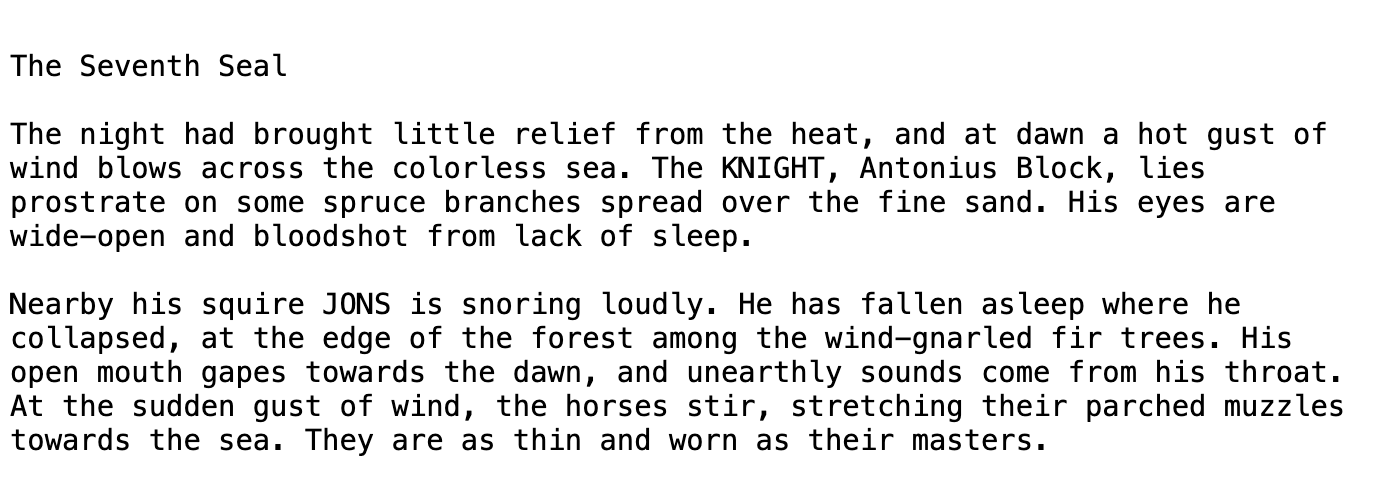
We will use the default models for every module in the pipeline, so the modules argument of the process method doesn't need to be leveraged.
# process the file through the pipeline, as described above
process_output = pipeline.process(
    local_file_path=data_dir + "input/seal.png",  # the initial local filepath where the input file is stored
    local_save_directory=data_dir + "output",  # the local directory that the output file will be saved to
    expire_time=60 * 30,  # process data will be deleted from the Krixik system in 30 minutes
    wait_for_process=True,  # wait for process to complete before returning IDE control to user
    verbose=False,
)  # do not display process update printouts upon running code
The output of this process is printed below. To learn more about each component of the output, review documentation for the process method.
Because the output of this particular module-model pair is a FAISS database file, process_output is "null". However, the output file has been saved to the location noted in the process_output_files key. The file_id of the processed input is used as a filename prefix for the output file.
# nicely print the output of this process
print(json.dumps(process_output, indent=2))
{
  "status_code": 200,
  "pipeline": "multi_semantically_searchable_ocr",
  "request_id": "93ad346b-344a-431f-9893-ffd1b55340a7",
  "file_id": "7360a295-435b-4beb-8174-d27aec08aa04",
  "message": "SUCCESS - output fetched for file_id 7360a295-435b-4beb-8174-d27aec08aa04.Output saved to location(s) listed in process_output_files.",
  "warnings": [],
  "process_output": null,
  "process_output_files": [
    "../../../data/output/7360a295-435b-4beb-8174-d27aec08aa04.faiss"
  ]
}
Performing Semantic Search
Krixik's semantic_search method enables semantic (a.k.a. vector) search on documents processed through certain pipelines. Given that the semantic_search method both embeds the query and performs the search, it can only be used with pipelines containing both a text-embedder module and a vector-db module in immediate succession.
Since our pipeline satisfies this condition, it has access to the semantic_search method. Let's use it to query our text with natural language, as shown below:
# perform semantic_search over the file in the pipeline
semantic_output = pipeline.semantic_search(query="The man sounds like he's dying.", file_ids=[process_output["file_id"]])

print(json.dumps(semantic_output, indent=2))
{
  "status_code": 200,
  "request_id": "b354328b-2588-49bb-b034-d81c0eb5fd68",
  "message": "Successfully queried 1 user file.",
  "warnings": [],
  "items": [
    {
      "file_id": "7360a295-435b-4beb-8174-d27aec08aa04",
      "file_metadata": {
        "file_name": "krixik_generated_file_name_lhmyxspuwj.png",
        "symbolic_directory_path": "/etc",
        "file_tags": [],
        "num_vectors": 8,
        "created_at": "2024-06-05 14:50:50",
        "last_updated": "2024-06-05 14:50:50"
      },
      "search_results": [
        {
          "snippet": "His eyes are\nwide-open and bloodshot from lack of sleep.",
          "line_numbers": [
            5,
            6
          ],
          "distance": 0.284
        },
        {
          "snippet": "His\nopen mouth gapes towards the dawn, and unearthly sounds come from his throat.",
          "line_numbers": [
            9,
            10
          ],
          "distance": 0.289
        },
        {
          "snippet": "He has fallen asleep where he\ncollapsed, at the edge of the forest among the wind-gnarled fir trees.",
          "line_numbers": [
            8,
            9
          ],
          "distance": 0.302
        },
        {
          "snippet": "Nearby his squire JONS is snoring loudly.",
          "line_numbers": [
            7,
            8
          ],
          "distance": 0.331
        },
        {
          "snippet": "At the sudden gust of wind, the horses stir, stretching their parched muzzles\ntowards the sea.",
          "line_numbers": [
            11,
            12
          ],
          "distance": 0.429
        }
      ]
    }
  ]
}